1. Organization Management
1.1 Organization Coaches
Access via: Top Nav > [Org Name] dropdown > Coaches
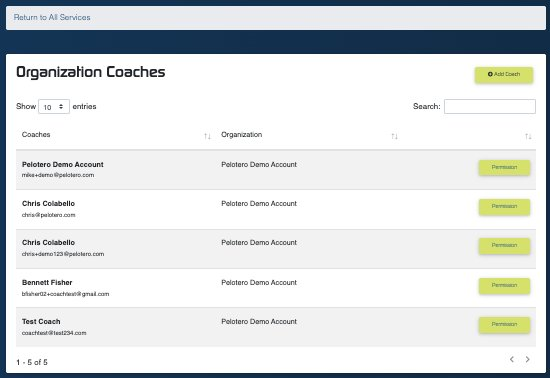
Figure 10: Organization Coaches — coach roster with permission management
Lists all coaches in your organization with their email, organization, and a Permission button to manage what each coach can see and do. Controls include adding new coaches via the 'Add Coach' button.
1.2 Organization Athletes
Access via: Top Nav > [Org Name] dropdown > Athletes
A master list of all athletes across every service in your organization. Useful for finding an athlete who may be enrolled in multiple services, or for adding an existing athlete to a new service without creating a duplicate profile.
1.3 Edit Profile
Access via: Top Nav > [Org Name] dropdown > Edit Profile
Manage your organization's name, contact information, logo, and subscription details.
1.4 Change Organization
Access via: Top Nav > [Org Name] dropdown > Change Organization
If your account has access to multiple organizations (e.g., a coach who works for multiple academies), you can switch between them here without logging out.
Was this article helpful?
That’s Great!
Thank you for your feedback
Sorry! We couldn't be helpful
Thank you for your feedback
Feedback sent
We appreciate your effort and will try to fix the article